Why I Built Codex Workspace Sessions for VS Code
AI-assisted development is powerful, but managing the workspace around the AI can still be distracting.
While working across multiple projects in VS Code, I often use Codex for planning, debugging, refactoring, reviewing code, and continuing long-running implementation tasks. Over time, each project naturally accumulates many chat sessions.
The challenge was not only finding the right conversation. It was keeping the coding workspace focused while moving between files, Explorer, Codex chat, and session history.
That is why I built Codex Workspace Sessions.
The Problem: Code, Chat, and Session History Compete for Space
VS Code provides a Primary Side Bar and a Secondary Side Bar. This flexibility is useful, but it can create a practical workflow problem when using an AI coding assistant heavily.
A typical setup may contain:
- Code editor in the main area.
- File Explorer in one sidebar.
- Codex chat in another editor group or sidebar.
- A long list of previous Codex sessions that needs to be searched when returning to a task.
When the Codex chat or sidebar is opened and closed repeatedly, the editor layout shifts. The code area gets narrower, file navigation moves, and the visual focus changes.
This sounds minor, but it becomes noticeable when you are switching contexts many times in a day:
- You are implementing a feature and need to continue a previous Codex discussion.
- You need to check a session related to a specific module.
- You open the AI chat, then need the Explorer again.
- You close a sidebar to get more coding space.
- Later, you need the chat history again and must reorganize the layout.
The result is unnecessary context switching. The issue is not Codex itself—it is how session navigation, code navigation, and chat panels compete for the same limited workspace.
The Goal: Keep Each Part of the Workflow in Its Place
I wanted a layout where each activity has a clear and stable position:
- Code files and Explorer remain accessible on the left.
- The code editor remains the primary focus.
- Codex chat stays available beside the code.
- Codex session history can live in the right-side layout without taking over the coding area.
This makes the development environment feel closer to a structured workbench than a set of panels that constantly need to be opened, closed, and rearranged.
Instead of searching through all Codex chats globally, I also wanted the list to be aware of the project currently being worked on.
The Solution: Codex Workspace Sessions
Codex Workspace Sessions is a VS Code extension that organizes Codex sessions based on the currently active workspace.
The extension creates a dedicated Codex Sessions view that can be placed in the secondary sidebar. It gives session history its own predictable location, while preserving the editor and file navigation layout.
The intended flow is simple:
- Open a project in VS Code.
- Keep your code and files visible in their usual workspace area.
- Open the Codex Workspace Sessions panel on the right.
- Search or select the session related to the current project.
- Open the Codex conversation and continue working without losing your coding context.
A More Focused Layout for AI-Assisted Development
The extension is designed around a simple layout principle: do not let AI session navigation replace the code workspace.
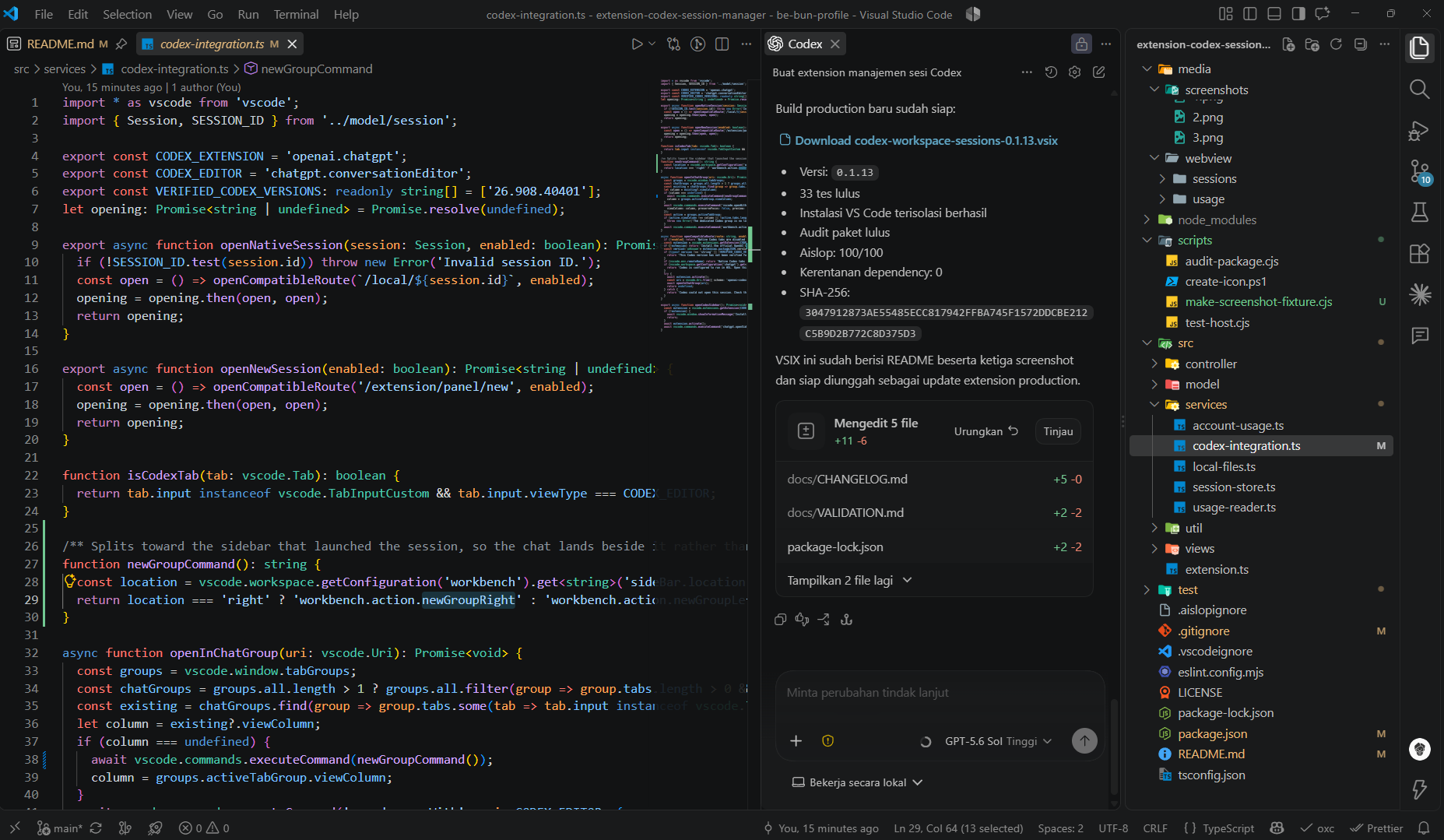
With the right-side session panel:
- The left side remains dedicated to files and project navigation.
- The center remains focused on the source code.
- The Codex chat can stay beside the code for quick collaboration.
- Session discovery happens in a separate, consistent location.
This reduces the habit of constantly hiding and reopening sidebars just to switch between coding and AI context.
It is especially useful for projects with many topics and long-running sessions, such as:
- Backend API migrations
- Feature development by module
- Debugging sessions
- Refactoring discussions
- Deployment and infrastructure tasks
- Test and quality-review sessions
Workspace-Aware Session List
A global chat history is useful, but it can become noisy when you work across many repositories.
Codex Workspace Sessions focuses on the active workspace so the session list stays relevant to the project in front of you.
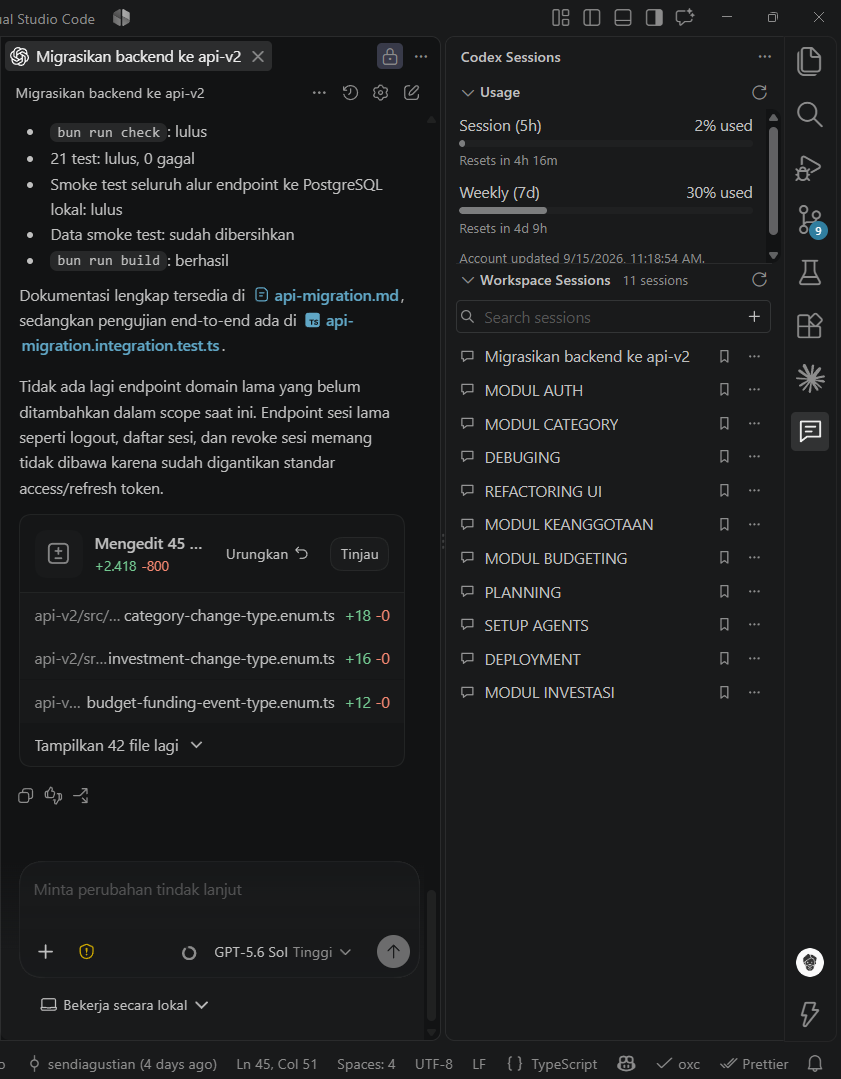
For example, when working on a finance API project, the session list can contain topics such as:
- Backend migration
- Authentication module
- Category module
- Debugging
- UI refactoring
- Deployment
- Testing
This makes it easier to return to a specific context without manually scanning through unrelated conversations from other projects.
Search and Quick Session Access
The extension includes a session search field so users can quickly locate a conversation by title.
This is helpful when a project has many sessions and the title is the fastest way to recover the context of previous work.
Instead of reopening a general chat panel and scrolling through a large history, the session list is available directly in the workspace layout.
Usage Visibility in the Same Panel
Another feature included in the extension is account usage visibility.
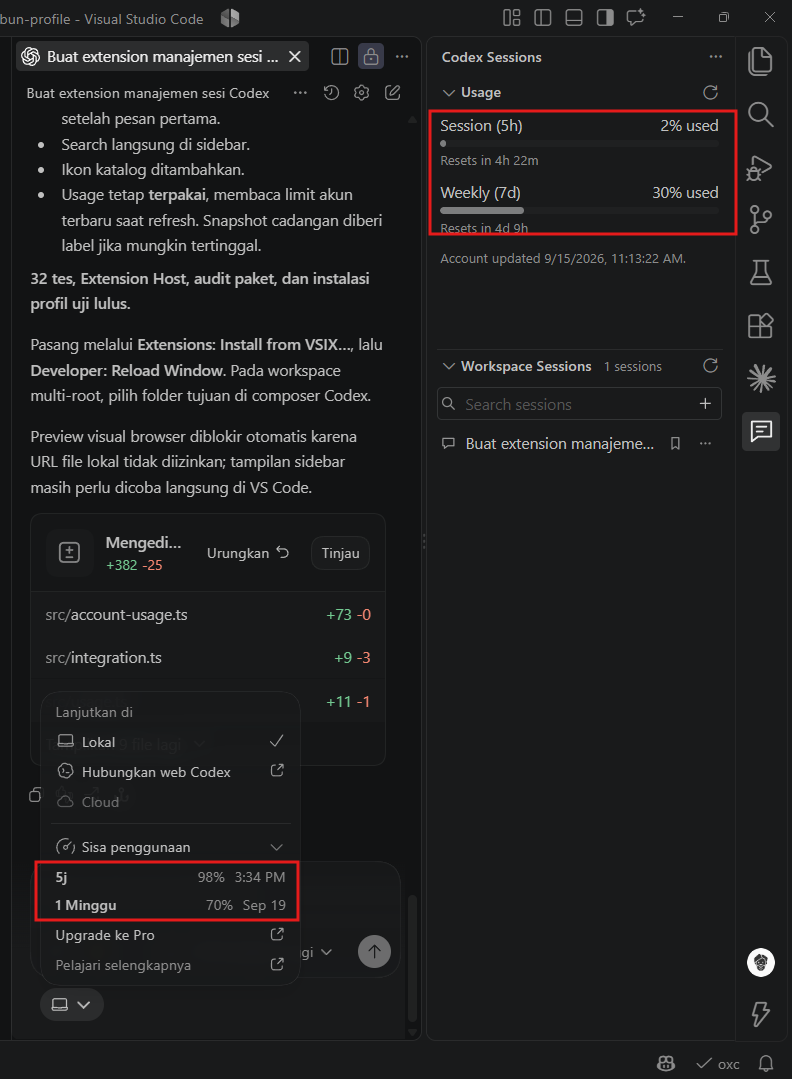
The panel displays the current usage for:
- Session limit
- Weekly limit
- Remaining reset time
- Last account update time
This keeps important usage information visible without needing to interrupt the coding flow or open a separate view.
For developers who use Codex frequently throughout the day, this is useful for planning work around available session capacity.
Why This Matters
AI coding tools are not only about generating code. They are also about preserving context.
A productive workflow requires more than a chat box. It needs a workspace where:
- The current code remains visible.
- The right project context is easy to recover.
- Session history does not overwhelm the editor.
- The AI assistant feels integrated into the development flow.
Codex Workspace Sessions is my attempt to solve that small but recurring usability issue.
It does not replace Codex. It improves how I organize and access Codex conversations while working inside VS Code.
Try Codex Workspace Sessions
Codex Workspace Sessions is available on the Visual Studio Code Marketplace:
Install Codex Workspace Sessions
I built it from a real daily workflow problem: keeping code, project files, AI chat, session history, and usage information organized without constantly rearranging the VS Code layout.
If you work with Codex across multiple projects, I hope it helps make your workspace feel more focused and intentional.
#VSCode #Codex #OpenAI #AIEngineering #DeveloperTools #Productivity #SoftwareEngineering