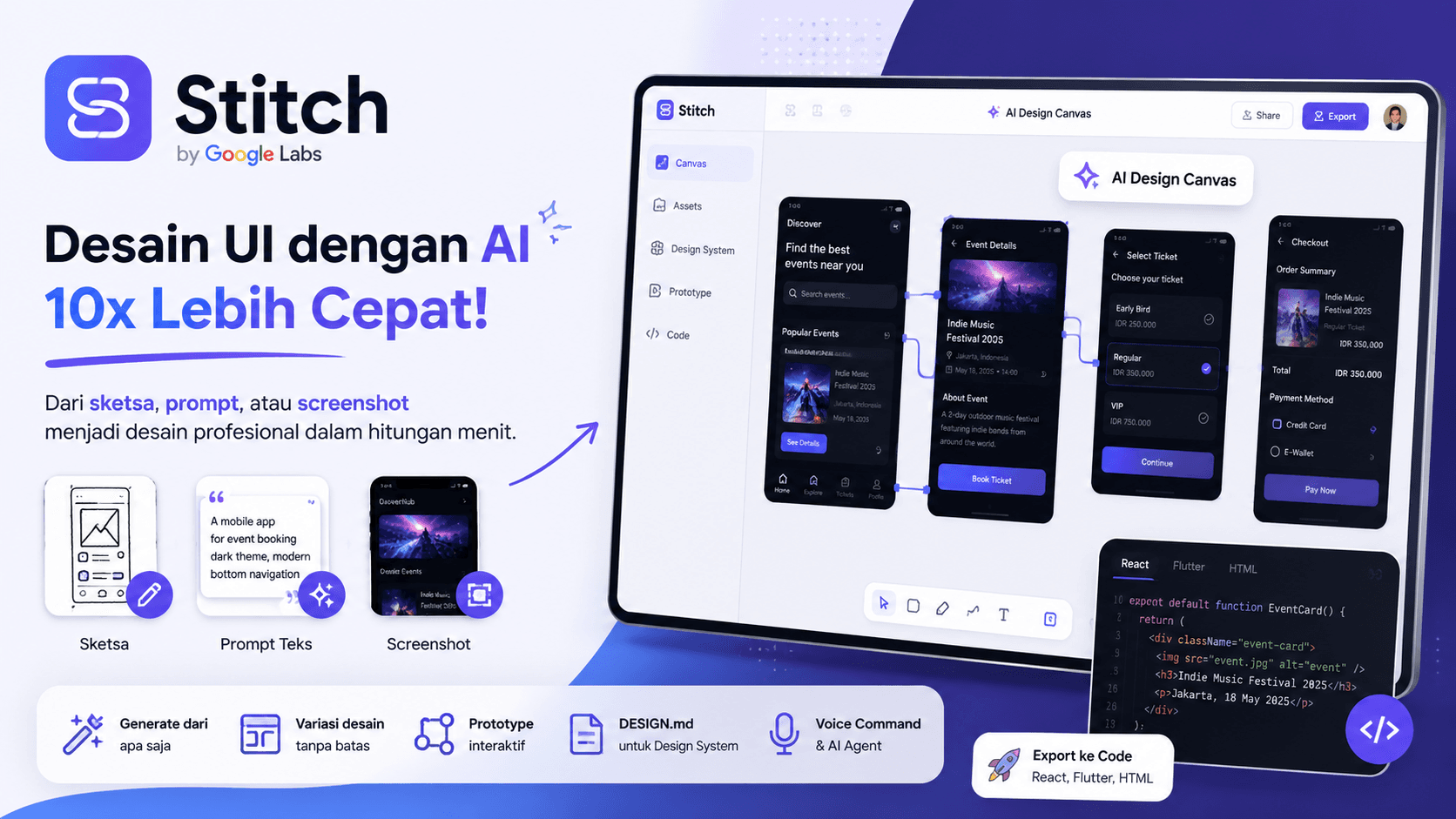
The Common Problem in UI Design
Creating a UI design usually takes more than one step.
Designers need to create wireframes, collect references, explore layout variations, and adjust colors, components, and screen flows.
After that, frontend developers still need to translate the design into working code.
This process often takes time because there are many revisions between ideas, design, and implementation.
This is where Google Stitch becomes interesting.
What Is Google Stitch
Google Stitch is an experimental tool from Google Labs that helps users create UI designs with AI.
With Stitch, users can generate UI designs from several types of input, such as:
- text prompts
- reference images
- simple wireframes
- app screenshots
- product ideas
- visual style examples
The goal is not only to generate UI images, but also to speed up the process from early ideas into cleaner designs that can move closer to development.
For designers, it helps with visual exploration.
For frontend developers, it can help create an early layout foundation before deeper implementation.
Latest Update: From AI UI Generator to AI Design Canvas
At first, Stitch was known as a tool for generating UI from prompts or images.
Its latest direction makes it closer to an AI-powered design canvas.
Google describes this as an AI-native software design canvas. This means the design process does not always need to start from a wireframe. It can start from a business goal, product mood, visual inspiration, or user need.
Users can bring different types of context into the canvas, including text, images, and code.
From there, AI helps explore ideas, create design variations, and build app flows faster.
Key Features of Google Stitch
Generate UI from Prompts
Users can write a simple instruction.
Example:
Create a mobile app UI for an event booking platform with a modern dark theme and bottom navigation.
Stitch can then generate an initial UI design based on the instruction.
Generate UI from Images or Screenshots
Stitch can also use image input.
For example, a user may have a rough paper sketch or a screenshot from another app as a reference. Stitch can understand the visual context and turn it into a cleaner UI design.
This is useful for fast brainstorming.
Infinite Canvas
The latest Stitch update introduces a more flexible canvas.
Users can place many ideas in one workspace, compare variations, and develop designs step by step.
This is useful for designers who want to explore different visual directions before choosing the final design.
Design Agent and Agent Manager
Stitch is also moving toward an agent-based workflow.
The design agent can understand project progress, give feedback, and help explore multiple ideas in parallel.
With Agent Manager, design exploration can become more organized.
DESIGN.md for Design Systems
One of the interesting updates is DESIGN.md support.
In simple terms, DESIGN.md is a markdown file that contains design rules, such as colors, typography, button styles, spacing, and other visual patterns.
This file helps AI tools, developer tools, or other projects understand the design system more clearly.
With this approach, the design does not only look good, but also follows more consistent rules.
Interactive Prototypes
Stitch is also moving toward interactive prototyping.
Users can connect multiple screens and preview the app flow quickly.
This helps teams understand the user journey before the design enters the development stage.
Voice Commands
The latest update also introduces voice capabilities.
Users can speak directly to the canvas to request design changes.
For example:
Create three color variations for this screen.
Or:
Change this layout so it fits a SaaS dashboard better.
This makes the design process feel more natural and faster.
Benefits for Designers
For designers, Stitch can speed up the ideation phase.
Designers no longer need to always start from a blank canvas. They can start from a prompt, screenshot, product mood, or rough sketch.
Practical benefits include:
- faster early concepts
- easier design variation
- better layout exploration
- quicker prototype creation
- clearer design direction
However, designers still need to curate the result.
AI can generate many options, but the best design decisions still depend on user needs, brand direction, and product context.
Benefits for Frontend Developers
For frontend developers, Stitch is interesting because it can help bridge design and code.
Stitch can help generate early UI structure and give a clearer idea of which components need to be built.
However, AI-generated code still needs review.
Developers should still check:
- component structure
- responsive layout
- accessibility
- state management
- API integration
- long-term maintainability
So, Stitch works better as an early-stage assistant, not as a full replacement for engineering work.
Can Stitch Replace Figma
In my opinion, Stitch is not yet a full replacement for Figma.
Figma is still very strong for design systems, team collaboration, reusable components, design handoff, and mature product workflows.
Stitch is better positioned as an idea acceleration tool.
Use Stitch to speed up design exploration, then continue with Figma or another design tool for final polish, documentation, and deeper collaboration.
[H2] A Practical Workflow
A simple workflow can look like this:
- Write a short product brief.
- Create a prompt in Stitch.
- Upload a sketch or screenshot if needed.
- Generate several UI variations.
- Choose the strongest design direction.
- Create an interactive prototype.
- Export or continue in design and development tools.
- Let developers review and implement the final version.
With this workflow, Stitch acts as an ideation partner, not a replacement for the entire design and coding process.
Things to Keep in Mind
Because Stitch is still part of Google Labs experimentation, its features, access, and usage limits may change over time.
AI results are also not always production-ready.
Several things still need manual review:
- design consistency
- brand alignment
- UX quality
- microcopy details
- component structure
- frontend code quality
- responsive and accessibility needs
AI can speed up the work, but it still needs human direction.
Conclusion
Google Stitch shows a new direction for UI/UX design.
Design does not always need to start from a blank canvas. We can start from a prompt, image, screenshot, sketch, or even a business goal.
Stitch is useful for speeding up ideation, generating UI variations, building prototypes, and supporting the early transition into frontend development.
However, Stitch should still be used wisely.
For the best result, use Stitch as a design co-worker. Let AI speed up exploration, while designers and developers make the final decisions to keep the result clean, consistent, and ready for real products.