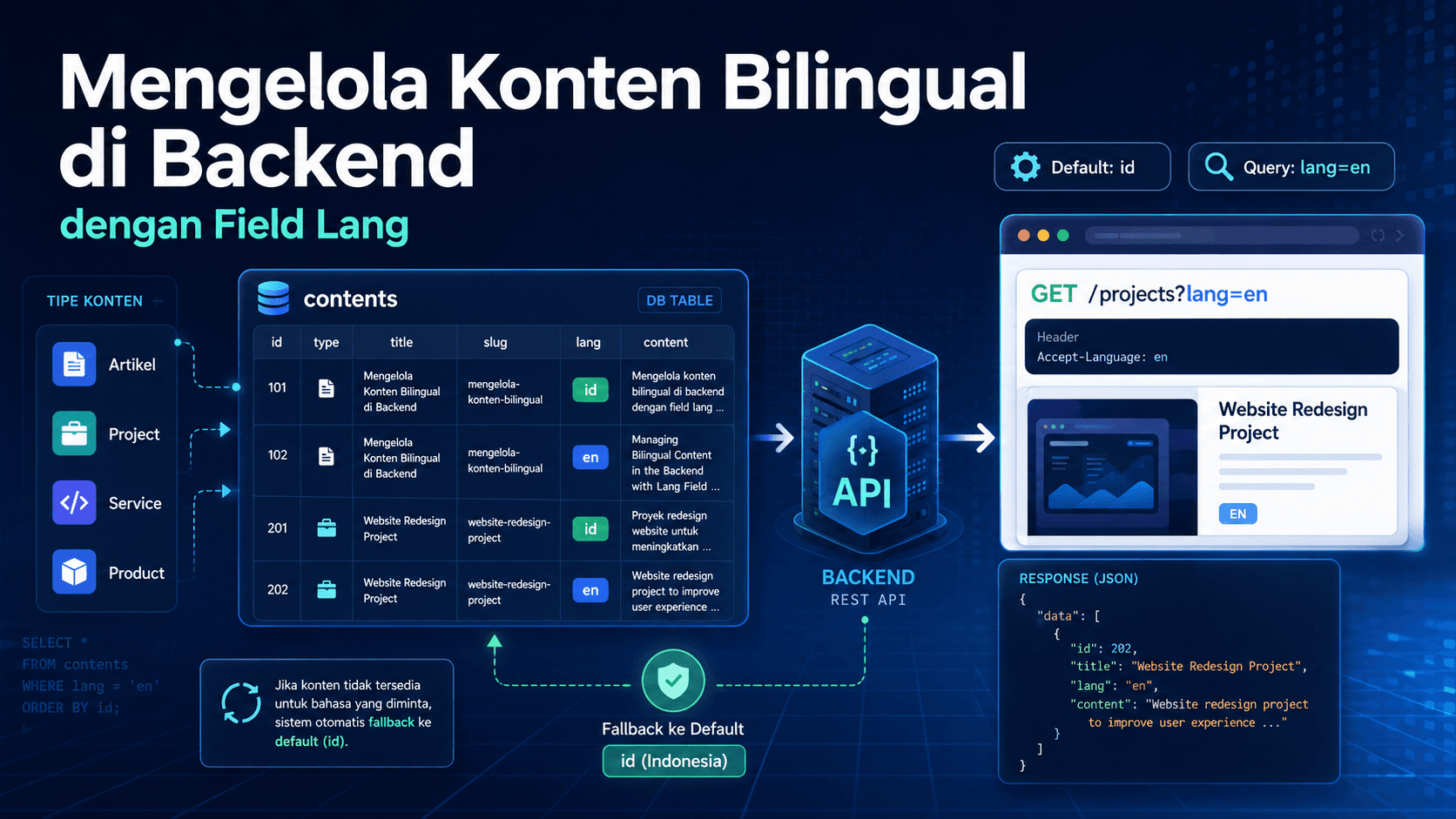
Why Bilingual Content Should Be Managed from the Backend
If the frontend supports Indonesian and English, the backend also needs to provide data based on the selected language. Otherwise, the frontend can only change UI labels while the actual content remains in one language.
For a web profile, data such as profile, projects, services, articles, links, and products should support language selection to keep the user experience consistent.
Using a Lang Field
A simple way to support bilingual content is by adding a lang field to content tables. The value can be id for Indonesian and en for English.
With this pattern, one table can store data for two languages. The frontend only needs to send a query parameter such as lang=en to request English content.
Default Language
The default language should remain id. This is important so older frontend code that does not send a lang query still works without errors.
Example:
- No lang query: return id data.
- With ?lang=en: return en data.
- With ?lang=xx: fallback to id.
How It Works in the Repository
The repository needs to add a WHERE lang = value filter for read endpoints. For detail endpoints, id and lang should be filtered together so the returned data matches the selected language.
Example flow:
- The frontend calls /projects?lang=en.
- The service reads the lang query.
- The repository fetches projects with lang en.
- The backend returns English data.
Benefits of This Pattern
- Simple implementation.
- The frontend can easily control language.
- ID and EN content can be different.
- No runtime auto-translation is required.
- Suitable for manually edited content.
Things to Consider
Data Must Be Complete
If English data has not been created, lang=en endpoints may return empty results. Because of this, seed data or the admin CMS should support two-language input.
Slugs Can Be Different
For articles, Indonesian and English slugs can be different. This is better for SEO because URLs can be adapted to each language.
Conclusion
The lang field is a simple and effective solution for bilingual backends. With id as the default and lang=en as an option, the frontend can support two languages without breaking old behavior.